tutorial / Sep 13, 2026
Set Up a Docker Hub Pull-Through Cache on One Home Server
Cache Docker Hub pulls on one Linux host while keeping the registry private to that host and preserving a clear rollback path.
What this cache does
A pull-through cache keeps recently requested Docker Hub image content on a local registry volume. The first pull still needs a working path to Docker Hub; later pulls can reuse cached layers when the requested content remains stored. That makes it useful for a single Linux home server that rebuilds or updates several containers, without turning the registry into a public service or pretending that it mirrors every container registry. Docker documents that daemon mirrors apply to Docker Hub, not arbitrary upstream registries.
This tutorial deliberately binds the cache to 127.0.0.1. Use this design when the Docker daemon and registry run on the same Linux host. It is not a multi-host mirror, a replacement for a private image registry, or an air-gapped solution. Distribution also documents that pushing to a pull-through cache is unsupported.
Prerequisites and limits
Before starting, confirm these requirements:
- A Linux host running Docker Engine with
sudoaccess and systemd control ofdocker.service. - A Compose-capable Docker installation and at least a few gigabytes of local disk space outside the Docker data directory.
- Outbound HTTPS access from the registry container to Docker Hub for cache misses.
- A maintenance window for restarting Docker after changing
/etc/docker/daemon.json.
Do not use these exact paths on Docker Desktop or on a host where another tool owns the Docker daemon configuration. Do not overwrite an existing daemon.json; merge the registry-mirrors array with the existing valid JSON instead. If the cache must serve other machines, stop here and design TLS, access control, DNS, and a network exposure policy rather than removing the loopback binding.
Create persistent cache storage
- Create a dedicated directory and a configuration file. The registry image stores cached blobs in its container path, so the bind mount below makes that cache survive a container replacement.
sudo install -d -m 0755 /srv/registry-cache/data
sudo install -d -m 0755 /srv/registry-cache
sudo nano /srv/registry-cache/config.yml- Add this minimal configuration to
/srv/registry-cache/config.yml. Theproxy.remoteurlsetting selects Docker Hub as the upstream, while the filesystem driver keeps cached content on the mounted volume.
version: 0.1
log:
  level: info
storage:
  filesystem:
    rootdirectory: /var/lib/registry
proxy:
  remoteurl: https://registry-1.docker.io
http:
  addr: :5000
  headers:
    X-Content-Type-Options: [nosniff]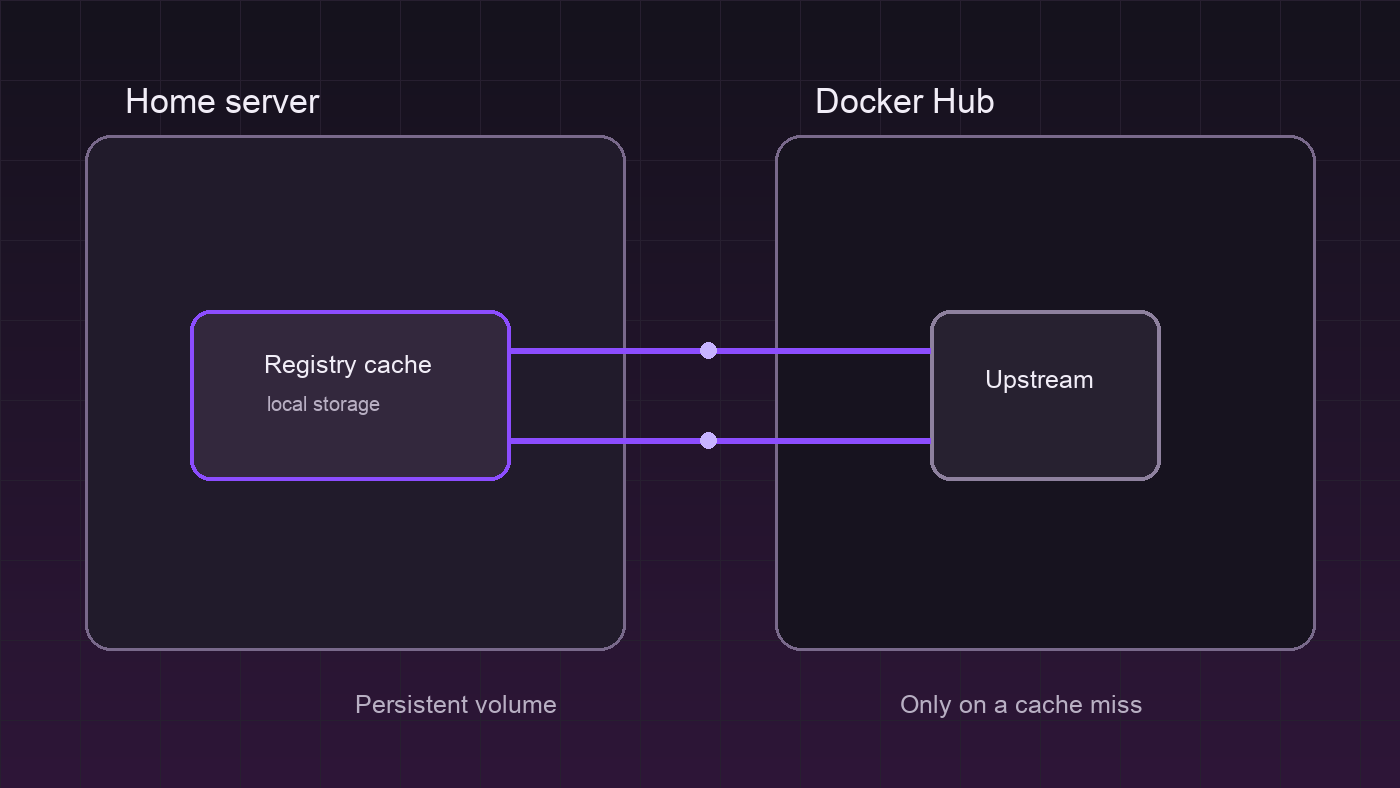
The Distribution mirror recipe requires proxy.remoteurl; the configuration reference explains the filesystem storage and proxy settings. Keep any Docker Hub credential out of this example unless rate-limit behavior requires a separately managed upstream credential.
Start the registry on loopback
- Create
/srv/registry-cache/compose.yamlwith a loopback-only port mapping.OTEL_TRACES_EXPORTER=noneavoids sending traces to a nonexistent local collector in this compact setup.
services:
  registry-cache:
    image: registry:3
    container_name: registry-cache
    restart: unless-stopped
    environment:
      OTEL_TRACES_EXPORTER: none
    ports:
      - "127.0.0.1:5000:5000"
    volumes:
      - /srv/registry-cache/data:/var/lib/registry
- /srv/registry-cache/config.yml:/etc/distribution/config.yml:ro- Start it and test its registry endpoint before changing the daemon.
cd /srv/registry-cache
sudo docker compose up -d
curl -fsS http://127.0.0.1:5000/v2/
sudo docker compose ps
An empty JSON response from /v2/ and a running container are the expected local results. Do not publish port 5000 through a router or change the mapping to 0.0.0.0:5000 for this single-host design.
Configure Docker to use the mirror
- Back up the current daemon configuration, then edit the existing JSON. On a typical Linux Engine install, Docker uses
/etc/docker/daemon.json; Docker's daemon reference documents that location.
sudo cp -a /etc/docker/daemon.json /etc/docker/daemon.json.before-registry-cache
sudo nano /etc/docker/daemon.json
Add this key inside the top-level JSON object, preserving every unrelated setting and comma correctly:
{
  "registry-mirrors": ["http://127.0.0.1:5000"]
}- Validate the JSON through Docker before restarting it, then restart only after validation succeeds.
sudo dockerd --validate --config-file /etc/docker/daemon.json
sudo systemctl restart docker
docker info | sed -n '/Registry Mirrors:/,/Live Restore Enabled:/p'
The expected result lists http://127.0.0.1:5000 under Registry Mirrors. A validation error means the prior daemon remains the safer state: restore the backup before attempting a restart.
Verify both allowed and denied paths
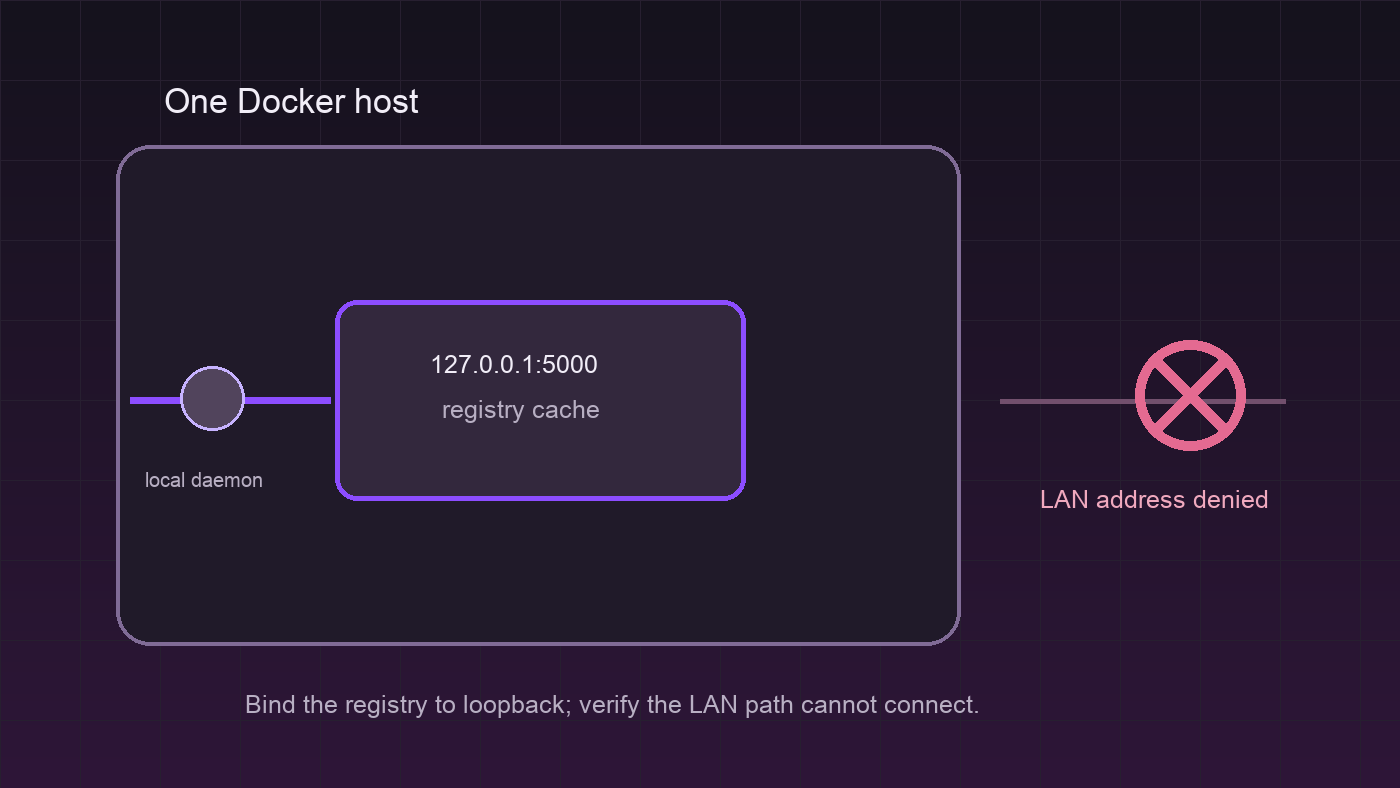
- Test an allowed pull, remove only the local image tag, and pull it again. The first request may populate the cache; the registry logs provide local evidence that the cache handled the request.
docker pull busybox:latest
docker image rm busybox:latest
docker pull busybox:latest
sudo docker logs registry-cache --tail 100- Test the denied path from another device on the same LAN. Replace
SERVER_LAN_IPwith the server's actual LAN address; the connection should fail because the registry only listens on loopback.
nc -vz SERVER_LAN_IP 5000A successful local pull plus a failed LAN connection is the intended outcome. If the LAN command connects, stop the registry with sudo docker compose down and inspect the ports line before continuing.
Troubleshooting and rollback
If Docker does not restart, restore the backup and validate it before restarting the service:
sudo cp -a /etc/docker/daemon.json.before-registry-cache /etc/docker/daemon.json
sudo dockerd --validate --config-file /etc/docker/daemon.json
sudo systemctl restart docker
If the registry container is unhealthy, inspect sudo docker logs registry-cache for upstream DNS, outbound HTTPS, permission, or YAML errors. Confirm that /srv/registry-cache/data remains writable by the container before deleting anything.
To remove the cache after Docker is no longer configured to use it, stop the compose project and remove its files only after confirming that no required cached layers remain:
cd /srv/registry-cache
sudo docker compose down
sudo rm -rf /srv/registry-cache
This rollback removes local cache content, not images already stored in Docker's own image cache. For background and configuration limits, read Docker's Docker Hub mirror guide.
Verification ledger